10 Best Project Management Tools
June 18, 2026
In the work of a project manager, the focus is not just on tasks, communication, projects, or deadlines. Much of the job revolves around specialized software and tools.
The market for project management tools is vast. Some platforms are designed for simple projects, while others can handle big amounts of data for complex initiatives. Many tools and features overlap, but teams usually pick the ones that are intuitive and fit their specific needs.
In this guide, we have compiled a list of top project management tools and highlighted their main features and benefits.
The market for project management tools is vast. Some platforms are designed for simple projects, while others can handle big amounts of data for complex initiatives. Many tools and features overlap, but teams usually pick the ones that are intuitive and fit their specific needs.
In this guide, we have compiled a list of top project management tools and highlighted their main features and benefits.
Jira

Jira is a powerful project and task management system developed by Atlassian. It is widely used as a workflow management tool and issue tracking system, especially in software development and IT environments.
Over time, Jira has evolved into a flexible platform that can be adapted to many different types of projects, from software engineering to marketing operations and general business workflows.
At its core, Jira is built around structured workflows and customizable boards. Teams can organize work using Kanban or Scrum based frameworks, depending on their preferred way of managing tasks.
Each project is represented as a board that contains issues, which are individual work items such as tasks, bugs, features, or requests. These issues can be moved through different workflow stages, such as To Do, In Progress, and Done, with each stage fully customizable based on the team’s process.
Each issue in Jira can include detailed information such as descriptions, assignees, deadlines, comments, attachments, and priority levels. Jira also supports backlog management, sprint planning, and release tracking, making it especially effective for Agile teams.
Key Features
One of Jira’s key advantages is its flexibility in supporting different workflows. Teams can design custom workflows that reflect their internal processes, whether simple or highly complex.
Jira has also integrated AI-powered capabilities in recent updates. These AI features help teams summarize issues, generate content for tickets, suggest improvements in workflows, or provide insights into project progress. AI can also assist in reducing manual administrative work by helping teams organize and prioritize tasks more effectively.
Integrations
As part of the Atlassian ecosystem, Jira connects seamlessly with tools such as Confluence, Bitbucket, Slack, Miro, Figma, GitHub, Google Workspace, and other third-party platforms.
Best For
Jira can be used across a wide range of industries and team types. It is commonly adopted by software development teams, IT departments, product teams, and even non-technical teams that require structured task tracking and workflow management.
Jira is a strong fit for both small and large teams, but it becomes particularly powerful in environments where projects involve multiple dependencies, stakeholders, and iterative delivery cycles.
Pricing
Jira offers several pricing tiers depending on team size and required functionality:
Over time, Jira has evolved into a flexible platform that can be adapted to many different types of projects, from software engineering to marketing operations and general business workflows.
At its core, Jira is built around structured workflows and customizable boards. Teams can organize work using Kanban or Scrum based frameworks, depending on their preferred way of managing tasks.
Each project is represented as a board that contains issues, which are individual work items such as tasks, bugs, features, or requests. These issues can be moved through different workflow stages, such as To Do, In Progress, and Done, with each stage fully customizable based on the team’s process.
Each issue in Jira can include detailed information such as descriptions, assignees, deadlines, comments, attachments, and priority levels. Jira also supports backlog management, sprint planning, and release tracking, making it especially effective for Agile teams.
Key Features
One of Jira’s key advantages is its flexibility in supporting different workflows. Teams can design custom workflows that reflect their internal processes, whether simple or highly complex.
Jira has also integrated AI-powered capabilities in recent updates. These AI features help teams summarize issues, generate content for tickets, suggest improvements in workflows, or provide insights into project progress. AI can also assist in reducing manual administrative work by helping teams organize and prioritize tasks more effectively.
Integrations
As part of the Atlassian ecosystem, Jira connects seamlessly with tools such as Confluence, Bitbucket, Slack, Miro, Figma, GitHub, Google Workspace, and other third-party platforms.
Best For
Jira can be used across a wide range of industries and team types. It is commonly adopted by software development teams, IT departments, product teams, and even non-technical teams that require structured task tracking and workflow management.
Jira is a strong fit for both small and large teams, but it becomes particularly powerful in environments where projects involve multiple dependencies, stakeholders, and iterative delivery cycles.
Pricing
Jira offers several pricing tiers depending on team size and required functionality:
- Free: $0 for up to 10 users. Includes unlimited projects, tasks, and forms, backlog management, list, board, timeline and calendar views, reports and dashboards, and community support.
- Standard: $7.91 per user/month. Includes everything in Free, plus user roles and permissions, external collaboration, and additional workflow and AI powered features.
- Premium: $14.54 per user/month. Includes everything in Standard, plus cross team planning, dependency management, customizable approval workflows, onboarding customization, and 24/7 support for critical issues.
- Enterprise: Custom pricing. Includes everything in Premium, plus advanced analytics through Atlassian data tools, enterprise grade security and admin controls, unlimited automation rule runs, cross product insights, and full enterprise support.
Trello

Trello is a widely used visual project management tool that helps teams simplify complex workflows and organize work in a clear and intuitive way. Built around boards, lists, and cards, it is designed to make task tracking easy to understand even for users with no prior experience in project management software.
Because of its simplicity and visual structure, Trello is often chosen by teams that value clarity and fast onboarding.
Key Features
One of Trello’s main strengths is its use of templates. The platform offers pre-built boards across different categories such as business, marketing, design, engineering, project management, and more. These templates are based on the same core structure of boards, lists, and cards, allowing teams to quickly set up workflows, organize tasks, and prioritize work without building everything from scratch.
Another useful feature is Trello Planner, which helps users schedule and organize tasks and events by connecting them with calendar tools. It allows teams to capture and manage plans across different time horizons, often syncing with tools like Google Calendar.
Trello also includes powerful no-code automation through its built-in automation engine. Each board can be configured to handle repetitive actions automatically, helping teams reduce manual work and focus on higher priority tasks. For example, Trello can send messages to Slack channels, create Jira tickets, update existing issues, or send automated email notifications based on specific triggers within a board.
In addition, Trello’s automation system can detect repeated patterns in user activity and suggest automations based on those behaviors.
Integrations
Integration capabilities are another important part of the platform. Trello connects with a wide range of popular tools used across communication, development, design, productivity workflows, and many other fields.
Common integrations include Slack, Jira, Miro, Google Drive, Gmail, Zapier, and many others. These integrations help teams centralize communication and connect Trello with their existing tech stack.
Best For
Trello is particularly well suited for small to medium sized teams, startups, and individuals who prefer a simple and highly visual approach to project management. It’s especially effective for web design, marketing campaigns, content planning, or other visually driven workflows where Kanban style organization is a natural fit.
Creative teams, marketing departments, and design focused groups often benefit the most from Trello’s visual workflow style, as it allows them to quickly map out ideas and track progress in an accessible format.
While Trello can scale to larger teams through advanced plans and integrations, its real strength lies in simplicity and ease of use rather than handling highly complex enterprise level project environments.
Pricing
Trello offers several pricing plans designed for different levels of team complexity:
Because of its simplicity and visual structure, Trello is often chosen by teams that value clarity and fast onboarding.
Key Features
One of Trello’s main strengths is its use of templates. The platform offers pre-built boards across different categories such as business, marketing, design, engineering, project management, and more. These templates are based on the same core structure of boards, lists, and cards, allowing teams to quickly set up workflows, organize tasks, and prioritize work without building everything from scratch.
Another useful feature is Trello Planner, which helps users schedule and organize tasks and events by connecting them with calendar tools. It allows teams to capture and manage plans across different time horizons, often syncing with tools like Google Calendar.
Trello also includes powerful no-code automation through its built-in automation engine. Each board can be configured to handle repetitive actions automatically, helping teams reduce manual work and focus on higher priority tasks. For example, Trello can send messages to Slack channels, create Jira tickets, update existing issues, or send automated email notifications based on specific triggers within a board.
In addition, Trello’s automation system can detect repeated patterns in user activity and suggest automations based on those behaviors.
Integrations
Integration capabilities are another important part of the platform. Trello connects with a wide range of popular tools used across communication, development, design, productivity workflows, and many other fields.
Common integrations include Slack, Jira, Miro, Google Drive, Gmail, Zapier, and many others. These integrations help teams centralize communication and connect Trello with their existing tech stack.
Best For
Trello is particularly well suited for small to medium sized teams, startups, and individuals who prefer a simple and highly visual approach to project management. It’s especially effective for web design, marketing campaigns, content planning, or other visually driven workflows where Kanban style organization is a natural fit.
Creative teams, marketing departments, and design focused groups often benefit the most from Trello’s visual workflow style, as it allows them to quickly map out ideas and track progress in an accessible format.
While Trello can scale to larger teams through advanced plans and integrations, its real strength lies in simplicity and ease of use rather than handling highly complex enterprise level project environments.
Pricing
Trello offers several pricing plans designed for different levels of team complexity:
- Free: $0 per user/month. Suitable for small teams and personal use. Includes up to 10 collaborators per workspace, unlimited cards, up to 10 boards per workspace, inbox, unlimited storage, custom backgrounds and stickers, two factor authentication, and mobile apps for iOS and Android.
- Standard: $5 per user/month. Designed for growing teams that need more flexibility. Includes everything in Free, plus unlimited boards, advanced checklists, card mirroring, and additional automation capabilities.
- Premium: $10 per user/month. Built for teams that need more control, visibility, and advanced features. Includes everything in Standard, plus AI-powered features, advanced admin and security controls, collections, simple data export, and enhanced workspace management tools.
- Enterprise: $17.50 per user/month. Intended for large organizations requiring enterprise grade security and governance. Includes everything in Premium, plus Atlassian Guard Standard, 24/7 enterprise support, organization wide permissions, unlimited workspaces, public board management, multi board guests, attachment permissions, and power up administration features.
ClickUp

ClickUp is one of the best choices for project management thanks in part to the powerful features and customizability. The platform allows teams to manage projects, tasks, documents, and chat all in one place. One of its strongest points is the AI integration, which helps teams work faster. Many users consider ClickUp an extremely powerful and customizable tool, often describing it as one of the best project management platforms available today.
Key Features
ClickUp offers a wide range of features for project managers. Teams can manage all their projects and documents in a single workspace, use automated reporting and resource management, and rely on AI powered workflows to handle tasks, dependencies, and deadlines. Routine project tasks can be automated thanks to ClickUp AI, which can generate project plans, assign tasks, and update statuses automatically. Searching for projects and files across the platform is fast and intuitive, allowing teams to find needed information in seconds.
The platform provides more than 15 views for any project type. Teams can choose from List, Gantt, calendar, and other views, ensuring everyone works in the way that suits them best.
ClickUp Docs serve as a central repository for project knowledge, plans, and documentation, enabling the creation of SOWs, project plans, and requirements that remain linked to tasks and timelines.
Forms allow teams to capture incoming work, change requests, and feedback, and route them automatically to the correct workflow and team. Chat enables teams to discuss projects, assign tasks, and generate action items directly from conversations, keeping collaboration centralized.
External collaborators and guests can be invited with granular permission controls to maintain workspace security. ClickUp AI also includes an AI notetaker that captures project meetings and key decisions, summarizing transcripts and automating post-call documentation.
Integrations
ClickUp integrates with over a thousand applications, including native integrations with Slack, Google Drive, Figma, Miro, and Chrome. It also supports importing data from other project management tools like Asana, Trello, Basecamp, Monday.com, and Jira. Third-party integrations include tools like Grammarly, OpenAI, Salesforce, and many more.
Best For
ClickUp is best suited for medium to large teams. While it is extremely powerful, its interface can feel overwhelming for smaller teams, but for larger groups, it provides excellent project tracking, visualization, and collaboration capabilities.
Pricing
ClickUp offers several plans to fit different team sizes and needs:
Key Features
ClickUp offers a wide range of features for project managers. Teams can manage all their projects and documents in a single workspace, use automated reporting and resource management, and rely on AI powered workflows to handle tasks, dependencies, and deadlines. Routine project tasks can be automated thanks to ClickUp AI, which can generate project plans, assign tasks, and update statuses automatically. Searching for projects and files across the platform is fast and intuitive, allowing teams to find needed information in seconds.
The platform provides more than 15 views for any project type. Teams can choose from List, Gantt, calendar, and other views, ensuring everyone works in the way that suits them best.
ClickUp Docs serve as a central repository for project knowledge, plans, and documentation, enabling the creation of SOWs, project plans, and requirements that remain linked to tasks and timelines.
Forms allow teams to capture incoming work, change requests, and feedback, and route them automatically to the correct workflow and team. Chat enables teams to discuss projects, assign tasks, and generate action items directly from conversations, keeping collaboration centralized.
External collaborators and guests can be invited with granular permission controls to maintain workspace security. ClickUp AI also includes an AI notetaker that captures project meetings and key decisions, summarizing transcripts and automating post-call documentation.
Integrations
ClickUp integrates with over a thousand applications, including native integrations with Slack, Google Drive, Figma, Miro, and Chrome. It also supports importing data from other project management tools like Asana, Trello, Basecamp, Monday.com, and Jira. Third-party integrations include tools like Grammarly, OpenAI, Salesforce, and many more.
Best For
ClickUp is best suited for medium to large teams. While it is extremely powerful, its interface can feel overwhelming for smaller teams, but for larger groups, it provides excellent project tracking, visualization, and collaboration capabilities.
Pricing
ClickUp offers several plans to fit different team sizes and needs:
- Free Forever: Includes 60 MB storage, unlimited tasks, unlimited free members, collaborative docs, and 24/7 support.
- Unlimited: $7 per user/month. Includes everything in Free Forever plus unlimited Gantt charts, unlimited integrations, unlimited storage, guest permissions, resource management, and more.
- Business: $12 per user/month. Includes all Unlimited features plus unlimited dashboards with advanced cards, unlimited message history, unlimited activity views, unlimited timeline views, mind mapping, private whiteboards, custom exporting, and more.
- Enterprise: Custom pricing. Includes all Business features plus enterprise permissions and governance, unlimited custom roles, audit logs, enterprise API, custom branding, default personal views, live onboarding training, a customer success manager, access to managed services, and much more.
Asana

Asana is another popular platform that works well for project management and helps teams manage projects more efficiently. Its clean interface, straightforward navigation, and broad range of features make it a go-to solution for teams that want to organize work without introducing unnecessary complexity.
Key Features
One of Asana's biggest strengths is its ability to help teams identify risks before they turn into critical blockers. Managing a project often involves multiple moving pieces, any of which can delay progress. Asana allows teams to track work in real time, whether they are in the office or working remotely, making it easier to spot bottlenecks, monitor dependencies, and address potential issues before they affect delivery timelines.
The platform also supports flexible ways of working across different projects. Teams can choose the view that best fits their workflow, including List, Board, Calendar, and Timeline views. Switching between these layouts is seamless, allowing team members to manage projects in the way that feels most intuitive to them.
Asana can also support onboarding and team alignment. Managers can share visibility into roles, goals, and responsibilities from the beginning of a project, helping new team members understand how their work contributes to broader business objectives.
Another useful capability is task management across multiple projects. Through Asana's multi homing functionality, the same task can exist in several projects simultaneously. Any updates made to that task automatically sync across all connected projects in real time.
To help teams get started quickly, Asana provides a wide selection of ready made templates. Users can choose from templates for cross functional project plans, project reporting, Kanban boards, Gantt style timelines, kickoff meetings, action item tracking, and many other common workflows.
Asana also offers mobile applications for both iOS and Android, allowing project managers and team members to stay connected and informed regardless of where they are working.
Integrations
The platform also connects with more than 200 applications including popular tools Slack, Google Drive, Gmail, Microsoft Teams, Jira, Zoom, Salesforce, Adobe Creative Cloud, and many others.
Best For
We would say that Asana is particularly well suited for small and medium sized teams managing projects with low to moderate complexity. It is easy to adopt, intuitive for end users, and requires relatively little administrative effort.
As projects become increasingly complex and organizations require advanced portfolio management, highly customized workflows, or sophisticated resource planning, some teams may find themselves exploring more specialized alternatives. However, for many organizations, Asana provides an excellent balance between functionality and ease of use.
Pricing
Asana offers several pricing plans designed to support teams at different stages of growth:
Key Features
One of Asana's biggest strengths is its ability to help teams identify risks before they turn into critical blockers. Managing a project often involves multiple moving pieces, any of which can delay progress. Asana allows teams to track work in real time, whether they are in the office or working remotely, making it easier to spot bottlenecks, monitor dependencies, and address potential issues before they affect delivery timelines.
The platform also supports flexible ways of working across different projects. Teams can choose the view that best fits their workflow, including List, Board, Calendar, and Timeline views. Switching between these layouts is seamless, allowing team members to manage projects in the way that feels most intuitive to them.
Asana can also support onboarding and team alignment. Managers can share visibility into roles, goals, and responsibilities from the beginning of a project, helping new team members understand how their work contributes to broader business objectives.
Another useful capability is task management across multiple projects. Through Asana's multi homing functionality, the same task can exist in several projects simultaneously. Any updates made to that task automatically sync across all connected projects in real time.
To help teams get started quickly, Asana provides a wide selection of ready made templates. Users can choose from templates for cross functional project plans, project reporting, Kanban boards, Gantt style timelines, kickoff meetings, action item tracking, and many other common workflows.
Asana also offers mobile applications for both iOS and Android, allowing project managers and team members to stay connected and informed regardless of where they are working.
Integrations
The platform also connects with more than 200 applications including popular tools Slack, Google Drive, Gmail, Microsoft Teams, Jira, Zoom, Salesforce, Adobe Creative Cloud, and many others.
Best For
We would say that Asana is particularly well suited for small and medium sized teams managing projects with low to moderate complexity. It is easy to adopt, intuitive for end users, and requires relatively little administrative effort.
As projects become increasingly complex and organizations require advanced portfolio management, highly customized workflows, or sophisticated resource planning, some teams may find themselves exploring more specialized alternatives. However, for many organizations, Asana provides an excellent balance between functionality and ease of use.
Pricing
Asana offers several pricing plans designed to support teams at different stages of growth:
- Personal: Free. Suitable for individuals or small teams managing personal projects and basic workflows. Includes support for up to 2 users, unlimited tasks and projects, List, Board, and Calendar views, project status updates, and access to more than 100 free integrations.
- Starter: $10.99 per user/month. Designed for growing teams that need additional planning and reporting capabilities. Includes all Personal features, plus Timeline and Gantt style views, dashboards for reporting, unlimited automations, custom templates, and unlimited free guest collaborators.
- Advanced: $24.99 per user/month. Built for organizations that require greater visibility and operational control. Includes all Starter features, along with integrations with Salesforce, Tableau, and Power BI, time tracking capabilities, enhanced security features, formulas, and unlimited portfolios.
- Enterprise: Custom pricing. Intended for larger organizations with advanced governance and security requirements. Includes all Advanced features, plus SAML authentication, enhanced administrative controls, project level permissions, guest invitation management, dedicated support options, and other enterprise grade capabilities.
Notion

Notion calls itself an all-in-one workspace for notes, documents, tasks, projects, spreadsheets, and databases. For project management, it’s a versatile tool that stands out for its flexibility and easy customization. You can basically turn Notion into almost any other tool, keeping everything in a single workspace no matter how your projects evolve.
Key Features
Project managers can use Notion in many ways. You can create task lists and track progress, manage project timelines, and organize resources. It offers a variety of templates for sprints, kanban boards, and roadmaps, which makes it easy to get started quickly.
The database feature allows PM’s to store and connect information across different projects, making it simple to maintain an overview of tasks, deadlines, and responsibilities.
Integrations
The Notion application also integrates with popular services like Slack, Google Docs, Gmail, and more. AI features in Notion can assist with meeting notes, task suggestions, and content generation, helping teams save time and stay organized.
Best For
We would say that the choice of Notion primarily depends on the size of the company and the type of project management needed. It is perfect for startups because Notion is easy to set up and manage. Notion also works well for small teams or individuals who want a simple yet powerful workspace. Companies that quickly outgrow Notion may eventually look for more advanced or specialized applications, but for rapid implementation and flexibility, Notion is hard to beat.
Pricing
Notion offers four plans to suit different needs:
Key Features
Project managers can use Notion in many ways. You can create task lists and track progress, manage project timelines, and organize resources. It offers a variety of templates for sprints, kanban boards, and roadmaps, which makes it easy to get started quickly.
The database feature allows PM’s to store and connect information across different projects, making it simple to maintain an overview of tasks, deadlines, and responsibilities.
Integrations
The Notion application also integrates with popular services like Slack, Google Docs, Gmail, and more. AI features in Notion can assist with meeting notes, task suggestions, and content generation, helping teams save time and stay organized.
Best For
We would say that the choice of Notion primarily depends on the size of the company and the type of project management needed. It is perfect for startups because Notion is easy to set up and manage. Notion also works well for small teams or individuals who want a simple yet powerful workspace. Companies that quickly outgrow Notion may eventually look for more advanced or specialized applications, but for rapid implementation and flexibility, Notion is hard to beat.
Pricing
Notion offers four plans to suit different needs:
- Free: $0 per month / member. Ideal for individuals to organize personal projects and life. This plan includes a trial of Notion AI, basic forms, basic sites, Notion calendar, Notion mail, and some databases.
- Plus: $10 per month / member. Plus plan is good for small teams and professionals working together. It includes everything in the Free plan plus custom forms, unlimited charts, unlimited collaborative blocks, and basic integrations with Slack, Gmail, and Google Docs.
- Business: $20 per month / member. Designed for growing businesses to streamline teamwork. This plan includes everything in Plus, along with AI meeting notes, private team spaces, domain verification, premium connections, Notion agent, and additional features.
- Enterprise: Custom pricing. Built for organizations that require scalability, control, and security. This plan includes all Business features plus audit logs, a customer success manager, domain management, advanced integrations, security and compliance connections, zero data retention with LLM providers, and more.
Smartsheet

Smartsheet is a software platform designed for collaboration and work management. It’s widely used by project teams that need to manage everything from a handful of projects to large portfolios involving multiple departments and stakeholders.
Key Features
One of the main reasons teams choose Smartsheet is its flexible and user friendly interface for organizing and visualizing data. Users can customize how information is displayed and switch between different views, making it easier to track progress, manage workloads, and keep projects on schedule.
Another area where Smartsheet stands out is automation. Teams can automate repetitive processes, notifications, approvals, and status updates, reducing manual work and helping projects move forward more efficiently.
AI-powered features have become an increasingly important part of the platform. Smartsheet AI can help generate formulas, analyze project data, summarize content, and provide insights that support faster decision making. The platform also integrates with AI powered automation tools across an organization's technology stack.
For project managers handling multiple projects, Smartsheet provides powerful cross project visibility. Information from different sheets can be linked together through reports, dashboards, and project portfolios, giving teams a clearer view of milestones, dependencies, and overall project health.
Integrations
Smartsheet connects with many popular business applications, including Google Workspace, Slack, Jira, Salesforce, Microsoft Teams, Power BI, and other cloud based tools.
Best For
We would recommend Smartsheet for organizations that need more structure and reporting capabilities than simpler project management tools provide. It works particularly well for growing teams, enterprise environments, and projects that require detailed tracking, automation, and portfolio management.
Pricing
Smartsheet offers four plans designed for different team sizes and business needs:
Key Features
One of the main reasons teams choose Smartsheet is its flexible and user friendly interface for organizing and visualizing data. Users can customize how information is displayed and switch between different views, making it easier to track progress, manage workloads, and keep projects on schedule.
Another area where Smartsheet stands out is automation. Teams can automate repetitive processes, notifications, approvals, and status updates, reducing manual work and helping projects move forward more efficiently.
AI-powered features have become an increasingly important part of the platform. Smartsheet AI can help generate formulas, analyze project data, summarize content, and provide insights that support faster decision making. The platform also integrates with AI powered automation tools across an organization's technology stack.
For project managers handling multiple projects, Smartsheet provides powerful cross project visibility. Information from different sheets can be linked together through reports, dashboards, and project portfolios, giving teams a clearer view of milestones, dependencies, and overall project health.
Integrations
Smartsheet connects with many popular business applications, including Google Workspace, Slack, Jira, Salesforce, Microsoft Teams, Power BI, and other cloud based tools.
Best For
We would recommend Smartsheet for organizations that need more structure and reporting capabilities than simpler project management tools provide. It works particularly well for growing teams, enterprise environments, and projects that require detailed tracking, automation, and portfolio management.
Pricing
Smartsheet offers four plans designed for different team sizes and business needs:
- Pro: $9 per member / month. Pro level is suitable for individuals and small teams that want to track, share, and manage projects. Includes unlimited free contributors, rich formulas, unlimited sheets, forms and reports, 250 automations per month, and Gantt, Grid, Board, and Calendar views.
- Business: $19 per member / month. Designed for businesses looking to align people, projects, and programs. Includes all Pro features plus unlimited free guests, workload tracking, additional admin capabilities, Timeline view, and 1 TB of attachment storage.
- Enterprise: Custom pricing. Built for organizations that require advanced security, governance, and enterprise level project management. Includes all Business features plus AI formulas, AI generated text and charts, scenario planning, portfolios, SAML-based single sign on, and unlimited attachment storage.
- Advanced Work Management: Custom pricing. Intended for organizations managing large scale portfolios and complex business operations across multiple systems. Includes all Enterprise features plus Control Center, Dynamic View, Data Shuttle, Connectors, DataMesh, Calendar App, and Premium Support.
Coda

Coda is an all-in-one collaborative work platform that combines documents, databases, spreadsheets, project tracking, and team collaboration in a single workspace.
For a long time, Coda remained less widely known than platforms like other popular ones. However, it has gained significant attention in recent years, especially among business users and enterprise teams looking for highly customizable workspaces. While Coda positions itself as a solution for businesses, it can also be used for personal planning, knowledge management, or productivity.
Many users compare Coda to Notion because both platforms combine documents and project management capabilities. The difference is that Coda focuses heavily on turning documents into interactive applications. Users can build custom workflows, automate processes, create advanced databases, and design project management systems tailored to their specific needs. This flexibility is one of the main reasons teams choose Coda over other workspace solutions.
Key Features
One of the platform's strongest features is Coda AI. The built-in AI assistant is versatile and can help summarize content, generate tables, extract insights from data, answer questions about documents, and more.
Teams can also use AI powered templates to speed up project setup and reduce manual effort. For project managers, this means less time spent organizing information and more time focused on decision making and execution.
Coda AI also supports writing assistance by helping users draft content, improve clarity, suggest edits, and generate action items from meeting notes. These capabilities can be particularly useful for both project documentation and stakeholder communication.
Integrations
Another advantage of Coda is its extensive integration ecosystem. The platform connects with many popular business tools, including Figma, Jira, Slack, Salesforce, Miro, Zoom, Google Workspace, Asana, GitHub, Dropbox, and many others. These integrations allow teams to bring information from different systems into a single workspace.
Best For
Coda can work well for organizations of various sizes. Small businesses and startups often appreciate its flexibility and relatively low barrier to entry, while larger organizations can take advantage of advanced workflows, automation, and collaboration features.
Whether you are managing a small internal project or coordinating work across multiple teams, Coda provides enough customization to support different project management approaches.
Pricing
Coda offers several plans designed for individuals, teams, and enterprise organizations:
For a long time, Coda remained less widely known than platforms like other popular ones. However, it has gained significant attention in recent years, especially among business users and enterprise teams looking for highly customizable workspaces. While Coda positions itself as a solution for businesses, it can also be used for personal planning, knowledge management, or productivity.
Many users compare Coda to Notion because both platforms combine documents and project management capabilities. The difference is that Coda focuses heavily on turning documents into interactive applications. Users can build custom workflows, automate processes, create advanced databases, and design project management systems tailored to their specific needs. This flexibility is one of the main reasons teams choose Coda over other workspace solutions.
Key Features
One of the platform's strongest features is Coda AI. The built-in AI assistant is versatile and can help summarize content, generate tables, extract insights from data, answer questions about documents, and more.
Teams can also use AI powered templates to speed up project setup and reduce manual effort. For project managers, this means less time spent organizing information and more time focused on decision making and execution.
Coda AI also supports writing assistance by helping users draft content, improve clarity, suggest edits, and generate action items from meeting notes. These capabilities can be particularly useful for both project documentation and stakeholder communication.
Integrations
Another advantage of Coda is its extensive integration ecosystem. The platform connects with many popular business tools, including Figma, Jira, Slack, Salesforce, Miro, Zoom, Google Workspace, Asana, GitHub, Dropbox, and many others. These integrations allow teams to bring information from different systems into a single workspace.
Best For
Coda can work well for organizations of various sizes. Small businesses and startups often appreciate its flexibility and relatively low barrier to entry, while larger organizations can take advantage of advanced workflows, automation, and collaboration features.
Whether you are managing a small internal project or coordinating work across multiple teams, Coda provides enough customization to support different project management approaches.
Pricing
Coda offers several plans designed for individuals, teams, and enterprise organizations:
- Free. Suitable for individuals and small teams getting started with collaborative documents. This plan includes key features such as creating and collaborating on docs, unlimited pages and objects for nested docs, connected tables, charts, Kanban boards, and forms, as well as powerful formulas and automations. You can also try Coda AI features with a set of free credits.
- Pro: $10/month per Doc Maker. Designed for organizing your business and life. Includes everything in the Free plan, plus unlimited pages and objects, 30 day version history, hidden pages, custom domains, AI content rendering, and additional advanced features.
- Team: $30/month per Doc Maker. Built for collaboration across teams and tools. Includes everything in the Pro plan, plus unlimited automations, unlimited version history, folder access management, syncing across docs, and other enhanced team capabilities.
- Enterprise: Custom pricing. Intended for large organizations that need advanced security, governance, administrative controls, and enterprise level support.
Monday.com
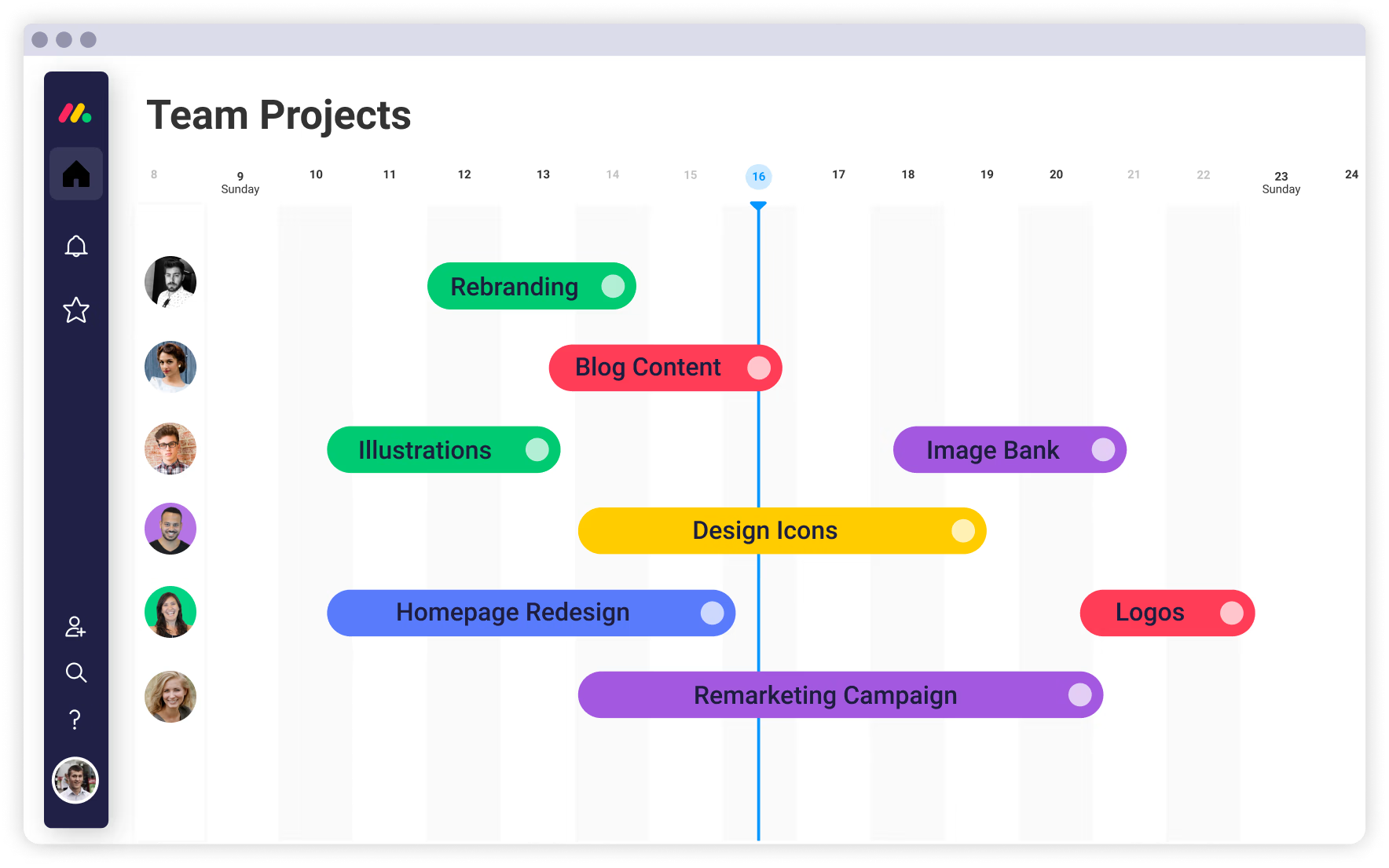
Another great solution for project management is Monday.com. Many teams choose this platform because of its ease of use, visually intuitive interface, and customizable workflows.
Key Features
One of Monday.com's strengths lies in project planning and initiation. Estimating timelines and building realistic project schedules can often be challenging, but the platform simplifies this process through customizable templates, including Gantt charts.
Monday.com also helps improve communication and collaboration within teams. Project managers can assign tasks, request approvals, provide feedback, share files, and keep conversations connected to specific work items. Since everything happens within the same platform and updates occur in real time, team members always have access to the most current information.
Tracking project performance is another area where Monday.com performs particularly well. Visual and customizable dashboards allow teams to monitor project progress, budgets, workloads, deadlines, and other important metrics.
Integrations
Like many modern project management tools, Monday.com integrates with a variety of popular business applications such as Slack, Microsoft Teams, Google Workspace, Zoom, Jira, Outlook, and many others. The platform also provides automation features that streamline routine processes and reduce manual updates.
Best For
While Monday.com offers many advantages, we would primarily recommend it for simple to moderately complex projects. However, organizations managing highly complex initiatives with extensive dependencies, advanced resource planning requirements, or industry specific needs may find that the platform falls short compared to more specialized project management solutions.
Pricing
In addition to a free trial, Monday.com offers flexible pricing plans designed for teams at different stages of growth:
Key Features
One of Monday.com's strengths lies in project planning and initiation. Estimating timelines and building realistic project schedules can often be challenging, but the platform simplifies this process through customizable templates, including Gantt charts.
Monday.com also helps improve communication and collaboration within teams. Project managers can assign tasks, request approvals, provide feedback, share files, and keep conversations connected to specific work items. Since everything happens within the same platform and updates occur in real time, team members always have access to the most current information.
Tracking project performance is another area where Monday.com performs particularly well. Visual and customizable dashboards allow teams to monitor project progress, budgets, workloads, deadlines, and other important metrics.
Integrations
Like many modern project management tools, Monday.com integrates with a variety of popular business applications such as Slack, Microsoft Teams, Google Workspace, Zoom, Jira, Outlook, and many others. The platform also provides automation features that streamline routine processes and reduce manual updates.
Best For
While Monday.com offers many advantages, we would primarily recommend it for simple to moderately complex projects. However, organizations managing highly complex initiatives with extensive dependencies, advanced resource planning requirements, or industry specific needs may find that the platform falls short compared to more specialized project management solutions.
Pricing
In addition to a free trial, Monday.com offers flexible pricing plans designed for teams at different stages of growth:
- Basic: $12 per seat/month. Suitable for professionals and small teams beginning to organize their work. Includes one workspace, one customizable dashboard, up to 1,000 active contacts and deals, and a limit of five columns per board.
- Standard: $17 per seat/month. Designed for growing business teams that need a more comprehensive set of tools. Includes all Basic features, along with up to 10,000 active contacts and deals, five customizable dashboards, three workspaces, up to 15 columns per board, and 250 automation actions.
- Pro: $28 per seat/month. One of the platform's most popular plans, built for teams ready to scale their operations. This plan expands the limits available in previous tiers and provides access to more dashboards, automations, and advanced workflow capabilities.
- Enterprise: Custom pricing. Intended for larger organizations that require enterprise grade controls, security, governance, and highly customized workflows. This plan removes many of the limitations found in lower tiers and provides additional support for complex organizational needs.
PMI Infinity AI Tool

PMI Infinity is an AI-powered solution developed by the Project Management Institute. The tool stands out among others reviewed in this guide.
While the other platforms focus primarily on task and project management, PMI Infinity shifts the emphasis toward AI powered project guidance and learning support. The platform is built on PMI's extensive body of knowledge and professional expertise. This means users receive guidance that aligns with recognized project management standards and methodologies.
Key Features
One of the platform's strongest advantages is its built in project management expertise. PMI Infinity combines insights from PMI standards and the broader project management community to deliver practical, project ready recommendations. Whether users need help understanding a concept, developing a project artifact, or navigating a challenging situation, the platform is designed to provide relevant support.
Security is another important focus. PMI Infinity has been developed with privacy and data protection in mind, allowing users to work with confidence. Information shared within the platform remains protected, making it a suitable environment for discussing project related challenges and generating deliverables.
The tool is powered by multiple AI models that provide context aware responses tailored to the way project professionals actually work. Instead of offering one size fits all answers, PMI Infinity adapts its guidance based on the user's questions and project context.
PMI Infinity also includes specialized AI capabilities for document analysis and content creation. Users can upload project documents and allow the platform to do much of the heavy lifting. The tool can extract key information, summarize content, identify important details, and analyze documentation. It can then help generate ready-to-use deliverables within minutes, saving valuable time and reducing administrative effort.
Best For
In our opinion, PMI Infinity is particularly valuable for individuals who are building or strengthening their project management knowledge. Members of the PMI community, professionals preparing for PMI certifications, and students exploring project management concepts may find this tool especially helpful.
More experienced professionals may appreciate the platform as an additional source of guidance and idea generation. However, PMI Infinity should not be viewed as a replacement for dedicated project management software designed for task management, scheduling, resource planning, and portfolio oversight.
As users grow in their careers and take on increasingly complex initiatives, they may naturally expand their toolkit to include more specialized project management platforms. That progression is often a sign of professional growth and increasing project maturity.
Pricing
Unlike traditional project management platforms, PMI Infinity is currently offered as part of the PMI membership ecosystem rather than as a standalone subscription.
The tool is available online and through the official PMI mobile application, making support accessible whenever it is needed.
While the other platforms focus primarily on task and project management, PMI Infinity shifts the emphasis toward AI powered project guidance and learning support. The platform is built on PMI's extensive body of knowledge and professional expertise. This means users receive guidance that aligns with recognized project management standards and methodologies.
Key Features
One of the platform's strongest advantages is its built in project management expertise. PMI Infinity combines insights from PMI standards and the broader project management community to deliver practical, project ready recommendations. Whether users need help understanding a concept, developing a project artifact, or navigating a challenging situation, the platform is designed to provide relevant support.
Security is another important focus. PMI Infinity has been developed with privacy and data protection in mind, allowing users to work with confidence. Information shared within the platform remains protected, making it a suitable environment for discussing project related challenges and generating deliverables.
The tool is powered by multiple AI models that provide context aware responses tailored to the way project professionals actually work. Instead of offering one size fits all answers, PMI Infinity adapts its guidance based on the user's questions and project context.
PMI Infinity also includes specialized AI capabilities for document analysis and content creation. Users can upload project documents and allow the platform to do much of the heavy lifting. The tool can extract key information, summarize content, identify important details, and analyze documentation. It can then help generate ready-to-use deliverables within minutes, saving valuable time and reducing administrative effort.
Best For
In our opinion, PMI Infinity is particularly valuable for individuals who are building or strengthening their project management knowledge. Members of the PMI community, professionals preparing for PMI certifications, and students exploring project management concepts may find this tool especially helpful.
More experienced professionals may appreciate the platform as an additional source of guidance and idea generation. However, PMI Infinity should not be viewed as a replacement for dedicated project management software designed for task management, scheduling, resource planning, and portfolio oversight.
As users grow in their careers and take on increasingly complex initiatives, they may naturally expand their toolkit to include more specialized project management platforms. That progression is often a sign of professional growth and increasing project maturity.
Pricing
Unlike traditional project management platforms, PMI Infinity is currently offered as part of the PMI membership ecosystem rather than as a standalone subscription.
- 30-Day Trial Membership: Free. PMI provides a 30-day trial membership with no credit card required and no automatic renewal. Trial users receive access to PMI Infinity, PMIstandards+, premium webinars, and selected project templates.
- PMI Professional Membership: Starting at $164 per year. Full PMI membership includes continued access to PMI Infinity, along with additional benefits such as digital PMI standards, discounted certification and learning opportunities, free and discounted eLearning resources, access to the Project Management Journal, and other professional development tools.
The tool is available online and through the official PMI mobile application, making support accessible whenever it is needed.
Wrike

Wrike is an AI-powered project management platform designed to help teams plan, execute, and monitor work more efficiently. It combines advanced project tracking capabilities, workflow automation, reporting tools, and AI-powered assistance within a single workspace. While the platform remains intuitive for everyday use, it also offers a level of sophistication that supports complex projects and enterprise level operations.
Key Features
Wrike includes a variety of AI-driven tools aimed at increasing productivity and simplifying project execution.
One of these capabilities is the Wrike Copilot, an AI assistant integrated directly into projects. It can answer questions, summarize ongoing work, surface relevant information, and help teams stay aligned without constant back and forth communication.
The platform also offers AI-powered productivity tools that assist teams in working smarter and faster. These features help automate routine activities and streamline collaboration, allowing project teams to focus more attention on strategic priorities.
Another major advantage of Wrike is its ability to provide visibility across projects and departments. Teams can access project details, updates, priorities, and dependencies within a centralized environment.
Reporting and analytics are also areas where Wrike performs particularly well. Its advanced analytics capabilities use project data to support decision making throughout the project lifecycle. Teams can generate real time reports, build visual dashboards, monitor performance metrics, and use AI-driven insights to identify potential risks and optimize resource allocation.
Wrike’s customization options are also great. Teams can tailor workflows, dashboards, request forms, and project structures to match their specific business processes. In addition, the platform offers a variety of templates that help organizations launch projects more quickly while maintaining consistency across teams.
Integrations
Wrike integrates with a broad range of business applications across categories such as communication, file management, software development, visual collaboration, and customer relationship management. Popular integrations include Zoom, Google Drive, Jira, GitHub, Microsoft Teams, Slack, Adobe Creative Cloud, Salesforce, and many others.
Best For
Wrike is well suited for organizations that require a balance between usability and advanced functionality. It can support project management teams, marketing departments, product organizations, IT teams, and engineering groups managing multiple initiatives simultaneously.
We would particularly recommend Wrike for medium sized and large organizations that need strong reporting capabilities, advanced analytics, cross departmental visibility, and highly customizable workflows. Smaller teams can also benefit from the platform, although they may not require its full range of sophisticated features.
Pricing
Wrike offers several plans designed to support organizations at different stages of growth:
Key Features
Wrike includes a variety of AI-driven tools aimed at increasing productivity and simplifying project execution.
One of these capabilities is the Wrike Copilot, an AI assistant integrated directly into projects. It can answer questions, summarize ongoing work, surface relevant information, and help teams stay aligned without constant back and forth communication.
The platform also offers AI-powered productivity tools that assist teams in working smarter and faster. These features help automate routine activities and streamline collaboration, allowing project teams to focus more attention on strategic priorities.
Another major advantage of Wrike is its ability to provide visibility across projects and departments. Teams can access project details, updates, priorities, and dependencies within a centralized environment.
Reporting and analytics are also areas where Wrike performs particularly well. Its advanced analytics capabilities use project data to support decision making throughout the project lifecycle. Teams can generate real time reports, build visual dashboards, monitor performance metrics, and use AI-driven insights to identify potential risks and optimize resource allocation.
Wrike’s customization options are also great. Teams can tailor workflows, dashboards, request forms, and project structures to match their specific business processes. In addition, the platform offers a variety of templates that help organizations launch projects more quickly while maintaining consistency across teams.
Integrations
Wrike integrates with a broad range of business applications across categories such as communication, file management, software development, visual collaboration, and customer relationship management. Popular integrations include Zoom, Google Drive, Jira, GitHub, Microsoft Teams, Slack, Adobe Creative Cloud, Salesforce, and many others.
Best For
Wrike is well suited for organizations that require a balance between usability and advanced functionality. It can support project management teams, marketing departments, product organizations, IT teams, and engineering groups managing multiple initiatives simultaneously.
We would particularly recommend Wrike for medium sized and large organizations that need strong reporting capabilities, advanced analytics, cross departmental visibility, and highly customizable workflows. Smaller teams can also benefit from the platform, although they may not require its full range of sophisticated features.
Pricing
Wrike offers several plans designed to support organizations at different stages of growth:
- Free Trial: 14 days with no credit card required. Allows teams to explore the platform before committing to a paid subscription.
- Team: $10 per user/month. Includes everything available in the Free plan, plus support for teams ranging from 2 to 15 users, AI Essentials, shareable dashboards, and interactive Gantt charts.
- Business: $25 per user/month. Includes everything in the Team plan, while expanding support to organizations with 5 to 200 users. Additional features include AI Elite capabilities and access to standard integrations.
- Pinnacle: Custom pricing. Designed for organizations managing highly complex workflows. Includes everything in the Business plan, plus advanced resource and capacity planning, budgeting functionality, advanced reporting capabilities, and enhanced API access.
- Apex: Custom pricing. Built for enterprises looking to combine human expertise with AI driven workflows at scale. Includes everything in the Pinnacle plan, along with unlimited whiteboards, advanced integrations and automations through Wrike Integrate, and bidirectional integrations with third party solutions through Wrike Sync.
Top 10 Project Management Tools: Detailed Comparison
Final Thoughts: How to Choose a PM Tool?
In this guide, the goal was not to rank one project management tool above another or to declare a single winner. The reality is that every team has its own way of working, and the right choice always depends on specific factors.
In practice, most teams today don’t rely on a single platform. Instead, they use a combination of tools that serve different purposes. Some solutions overlap in functionality, especially when it comes to task and workflow management. For example, tools like Jira and Trello can cover similar ground at a basic level, but they are often used in different contexts or levels of complexity. In many cases, one tool eventually replaces the other rather than both being used in parallel for the same workflow layer.
At the same time, certain tools can work very well together when they serve different functions. For instance, platforms like Notion can complement tools such as ClickUp or Jira by handling documentation, knowledge management, and planning, while the other tools focus more on execution and task tracking.
We would say that having multiple options is often more effective than trying to rely on a single all-in-one solution. It allows teams to choose the strengths of different tools and adapt their setup as projects evolve.
The choice of a project management tool is influenced by many factors, including team size, budget, required features, ease of use, integrations, and the overall ecosystem around the product.
Ultimately, there is no universal best tool. The ideal setup depends on how a team works, how complex their projects are, and what level of structure they need. The most effective approach is to select tools that genuinely support daily workflows rather than forcing teams to adapt to rigid systems.
In practice, most teams today don’t rely on a single platform. Instead, they use a combination of tools that serve different purposes. Some solutions overlap in functionality, especially when it comes to task and workflow management. For example, tools like Jira and Trello can cover similar ground at a basic level, but they are often used in different contexts or levels of complexity. In many cases, one tool eventually replaces the other rather than both being used in parallel for the same workflow layer.
At the same time, certain tools can work very well together when they serve different functions. For instance, platforms like Notion can complement tools such as ClickUp or Jira by handling documentation, knowledge management, and planning, while the other tools focus more on execution and task tracking.
We would say that having multiple options is often more effective than trying to rely on a single all-in-one solution. It allows teams to choose the strengths of different tools and adapt their setup as projects evolve.
The choice of a project management tool is influenced by many factors, including team size, budget, required features, ease of use, integrations, and the overall ecosystem around the product.
Ultimately, there is no universal best tool. The ideal setup depends on how a team works, how complex their projects are, and what level of structure they need. The most effective approach is to select tools that genuinely support daily workflows rather than forcing teams to adapt to rigid systems.